Crash on open - v1.0.0 Mac OS Sierra

Thanks, that’s very helpful. I’m currently having another look at this issue, will take a look at your logs right away.

Have to say it’s unfortunate that over a period of 5 months since the 1.0 launch I haven’t been able to run Fuse on my Mac.

Yes, I’m very sorry you’re experiencing these problems, and I fully understand your frustration. This issue have been a bit hard for us to investigate properly since we’re not experiencing this on any of our computers.

I don’t know exactly how long fixing this will take, but I can promise you we’re actively working on it.

Thanks for the quick response and kind words, Karsten. I can imagine how difficult it is to debug this when you don’t see that happening on your machines. Fuse is a cool product, and I met the Fuse team at Samsung DevConf 2016 in San Francisco. Really liked the the team members I met there, and the Fuse engine is amazing. So I hope you can find the cause of the problem.
Tell me if I can help by providing more input.

Thanks Raju, I hope we figure out this soon.

I’ve now prepared a custom build that might provide some extra information about the crash. It can be found along with instructions here (just ignore the “This is an older version of Fuse” warning).

We’d appreciate anyone experiencing this problem trying this version out and sending us their logs afterwards.

Thanks Karsten, just uploaded the log files to Dropbox. :slight_smile: Hope this helps!

Thanks for the very quick response.

What I’m seeing in the log is a bit unexpected though, unfortunately none of the extra diagnostics seems to have ended up in the log. If you start it one more time does it crash with a similar message from stdout again?

UnoHost failed to write message to designer: System.InvalidOperationException: Couldn't send data: System.Net.Sockets.SocketException: The socket has been shut down
  at System.Net.Sockets.Socket.Send (System.Byte[] buffer, Int32 offset, Int32 size, SocketFlags flags) <0x11c95adb0 + 0x00103> in <filename unknown>:0
  at Outracks.IPC.UnixSocketStream.Write (System.Byte[] buffer, Int32 offset, Int32 count) <0x11c9cbaf0 + 0x0005e> in <filename unknown>:0
  at Outracks.IPC.UnixSocketStream.Write (System.Byte[] buffer, Int32 offset, Int32 count) <0x11c9cbaf0 + 0x000d1> in <filename unknown>:0
  at System.IO.Stream.WriteByte (Byte value) <0x11c95a3f0 + 0x00054> in <filename unknown>:0
  at System.IO.BinaryWriter.Write (Byte value) <0x11c958f20 + 0x00024> in <filename unknown>:0
  at System.IO.BinaryWriter.Write7BitEncodedInt (Int32 value) <0x11c958ec0 + 0x0004c> in <filename unknown>:0
  at System.IO.BinaryWriter.Write (System.String value) <0x11c958be0 + 0x00058> in <filename unknown>:0
  at Outracks.BinaryMessage.WriteTo (IBinaryMessage message, System.IO.BinaryWriter writer) <0x11c958320 + 0x000d8> in <filename unknown>:0
  at Outracks.BinaryMessageStreams+<BeginWritingMessages>c__AnonStorey0+<BeginWritingMessages>c__AnonStorey1.<>m__0 (IBinaryMessage message) <0x11c9cba90 + 0x00025> in <filename unknown>:0
  at Outracks.DispatcherQueue`1[T].DispatchCurrent (System.Action`1 action, Optional`1 timeout) <0x11c1117a0 + 0x00104> in <filename unknown>:0
  at Outracks.DispatcherQueue`1[T].Dispatch (System.Action`1 action, CancellationToken ct) <0x11c110de0 + 0x0015e> in <filename unknown>:0
  at Outracks.BinaryMessageStreams+<BeginWritingMessages>c__AnonStorey0.<>m__0 () <0x11c122840 + 0x002fb> in <filename unknown>:0

Maybe the extra logging have had some unfortunate side effect I haven’t foreseen.

You are welcome. And yes, I can see the same error message in my console output:

[raju@GritMachine:~]$ /Applications/Fuse.app/Contents/Fuse\ Studio.app/Contents/MacOS/Fuse\ Studio 2>&1 | tee ~/.fuse/logs/fuse-studio-stdout.log
You are using dlopen without a full path, retrying by prepending /usr/lib
Fuse 1.3.0 (build 14586)
Dispatcher busy for 0.6769085 seconds (UI unresponsive)
You are using dlopen without a full path, retrying by prepending /usr/lib
# Verifying install status of sublime-plugin
Sublime plugin has not been installed
fuse: sublime-plugin is not installed.
new ObservableNSDocument()
ReadFromData(Fuse Project)
Getting window
Started simulator: 4763
Got window
Will show!
Reloading //Users/raju/fusetest/App/MainView.ux from disk...
Dispatcher busy for 2.9186855 seconds (UI unresponsive)
Dispatcher busy for 0.5390248 seconds (UI unresponsive)
Running UnoHost with args:"/Users/raju/fusetest/App/build/Local/Designer/App.dll" "9b038b94-ed34-45ea-afe8-4e3ef9cba3c5" "ee0e419b-c47c-4e73-99aa-3c5c89d55627" "//Users/raju/.fuse/designer-config.json" "--host" "127.0.0.1" "64941"
You are using dlopen without a full path, retrying by prepending /usr/lib
GL_VERSION: 2.1 INTEL-10.25.17
GL_VENDOR: Intel Inc.
GL_RENDERER: Intel(R) Iris(TM) Graphics 6100
Read Error
UnoHost failed to write message to designer: System.InvalidOperationException: Couldn't send data: System.Net.Sockets.SocketException: The socket has been shut down
  at System.Net.Sockets.Socket.Send (System.Byte[] buffer, Int32 offset, Int32 size, SocketFlags flags) <0x110e48530 + 0x00103> in <filename unknown>:0
  at Outracks.IPC.UnixSocketStream.Write (System.Byte[] buffer, Int32 offset, Int32 count) <0x110ec1750 + 0x0005e> in <filename unknown>:0
  at Outracks.IPC.UnixSocketStream.Write (System.Byte[] buffer, Int32 offset, Int32 count) <0x110ec1750 + 0x000d1> in <filename unknown>:0
  at System.IO.Stream.WriteByte (Byte value) <0x110e47d90 + 0x00054> in <filename unknown>:0
  at System.IO.BinaryWriter.Write (Byte value) <0x110e471f0 + 0x00024> in <filename unknown>:0
  at System.IO.BinaryWriter.Write7BitEncodedInt (Int32 value) <0x110e47190 + 0x0004c> in <filename unknown>:0
  at System.IO.BinaryWriter.Write (System.String value) <0x110e46ee0 + 0x00058> in <filename unknown>:0
  at Outracks.BinaryMessage.WriteTo (IBinaryMessage message, System.IO.BinaryWriter writer) <0x110e46b20 + 0x000d8> in <filename unknown>:0
  at Outracks.BinaryMessageStreams+<BeginWritingMessages>c__AnonStorey0+<BeginWritingMessages>c__AnonStorey1.<>m__0 (IBinaryMessage message) <0x110ec16c0 + 0x00025> in <filename unknown>:0
  at Outracks.DispatcherQueue`1[T].DispatchCurrent (System.Action`1 action, Optional`1 timeout) <0x1105767b0 + 0x00104> in <filename unknown>:0
  at Outracks.DispatcherQueue`1[T].Dispatch (System.Action`1 action, CancellationToken ct) <0x110575dd0 + 0x0015e> in <filename unknown>:0
  at Outracks.BinaryMessageStreams+<BeginWritingMessages>c__AnonStorey0.<>m__0 () <0x110587a10 + 0x002fb> in <filename unknown>:0

Hmm. This is odd, I probably have to look over the logging code once more and think more about other ways to investigate this.

Still, there are a couple more things worth trying:

  1. Have you tried starting the project with uno -tdotnet -r, and will this run the app or crash? EDIT: It probably won’t when I think about it, as the crash occurs when using main menu.
  2. I have created another custom build with an upgraded dependency here (Xamarin.Mac.dll). There’s a slight chance this could fix the problem, although not very likely.

Thanks again for being so helpful with diagnosing this :slight_smile:

  1. Yes, same crash happens when starting from console.
  2. Did a test run with the 14587 build, same behavior. I uploaded the log files to Dropbox.
  3. Running app from command line on device works without problems, so the build toolchain is not affected.

Some more questions:

  • Will Fuse crash when pressing down on a menu item, or when releasing the mouse (selecting the item)? Sorry if you’ve already answered this somewhere, just want to have this completely clear.
  • Will it crash when selecting any menu item?
  • Do you know if you have any installed software that might alter the behavior of menus in all running apps?
  • If you try to run Fuse from a fresh user account will you still get the same errors?
  • If you try booting up in safe mode by holding down shift does it still crash when using the menus?
    • Note that this is expected to make the computer very slow until restarting again.
    • Also the preview will be blank in safe mode, so Fuse won’t actually be usable.

I know this is asking for a lot, so I’m very grateful for any info you can provide here, and fully understand if any of these questions would take up too much time answering.

Also, before trying any of this it would be preferable to use the official 1.3 release, and not the custom build I provided. For some unknown reason that gave us less info in the logs.

Sorry, I didn’t see your reply before I posted the above.

Hmm… the fact that uno -tdotnet -r also crashes is very interesting. Feel free to ignore some of the more time consuming diagnostics steps here until we investigate this a bit more.

Just to avoid any misunderstandings; when you say “same crash happens when starting from console”, that means running uno -tdotnet -r in the project directory also produces error messages like this?

--- End of stack trace from previous location where exception was thrown ---
  at (wrapper managed-to-native) ObjCRuntime.Messaging:bool_objc_msgSend_IntPtr (intptr,intptr,intptr)
  at Foundation.NSObject.ConformsToProtocol (IntPtr protocol) <0x11cdc8af0 + 0x00146> in <filename unknown>:0
  at Foundation.NSObject.InvokeConformsToProtocol (IntPtr protocol) <0x11cdc8920 + 0x00018> in <filename unknown>:0
-

Good news, Karsten. Found the problem on my machine: I’m using a Window manager called Moom, and when Moom is running Fuse crashes when I interact with the menu. After quitting Moom the problem disappeared. Never had any problems with Moom in combination with other software, though. So not sure why it’s causing problems with Fuse.

The exact behavior is: With Moom running, when I open e.g. the “File” menu and then press the mouse button to select an entry, keep the button pressed, then Fuse with the latest official release will crash. Was able to reproduce that every time when Moom was active.

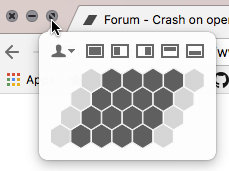
Wow, that’s a horrible behavior to debug - since there was nothing on your machine giving you any chance to reproduce the error. Moom actually doesn’t modify the menu, but shows an additional menu when hovering over the fullscreen icon for the window:

file

Maybe other users with the same problem have similar software running. Now would be a good time to get a delicious cup of coffee. :slight_smile:

Wow, that’s great!

I’ve never heard about Moom before, and don’t know how popular this is. But this is a promising path to investigate further, and I will try to install the extension and see if I can also reproduce this.

I will also do some more research and find out if there’s some other popular applications out there that do something similar.

Thanks again, and I hope you can finally have a bit of fun using Fuse… :slight_smile:

Very welcome, Karsten! Debugging those kind of bugs can be so frustrating, there’s so much complexity for desktop apps, since you never know what kind of software has been installed on a user’s machine.

One addition regarding the uno command: I don’t know the correct syntax for that, here’s what happens when I use it:

[raju@GritMachine:~/fusetest/App1]$ uno -tdotnet -r
ERROR: '-tdotnet' is not a valid command -- see "uno --help" for a list of commands. (pass --trace for stack trace)

What I did was use the normal fuse command from console instead of referencing the OS X app folder:

[raju@GritMachine:~/fusetest/App1]$ fuse preview -v

This gave me the same behavior with the following output in the log file:

2017-10-24 14:07:59,565 [9720:1] INFO  Fuse - Initializing with arguments 'preview -v'
2017-10-24 14:07:59,603 [9720:1] INFO  Fuse - Version 1.3.0.14520
2017-10-24 14:07:59,606 [9720:1] INFO  Dashboard - Initializing with arguments ''
2017-10-24 14:07:59,608 [9720:1] INFO  Fuse - Initializing with arguments ''
2017-10-24 14:07:59,644 [9720:1] INFO  Fuse - Initializing with arguments ''
2017-10-24 14:08:00,053 [9722:1] INFO  Fuse - Initializing with arguments 'daemon -b'
2017-10-24 14:08:00,084 [9722:1] INFO  Fuse - Version 1.3.0.14520
2017-10-24 14:08:00,086 [9722:1] INFO  Dashboard - Initializing with arguments ''
2017-10-24 14:08:00,088 [9722:1] INFO  Fuse - Initializing with arguments ''
2017-10-24 14:08:00,120 [9722:1] INFO  daemon - Initializing with arguments ''
2017-10-24 14:08:00,159 [9722:1] INFO  Daemon - Starting daemon with arguments '-b'
2017-10-24 14:08:00,170 [9722:1] INFO  Daemon - Trying to start the daemon as a background process.
2017-10-24 14:08:00,678 [9722:1] INFO  Daemon - A daemon background process was successfully started.
,522 [9724:1] INFO  Fuse - Version 1.3.0.14520
2017-10-24 14:08:00,524 [9724:1] INFO  Dashboard - Initializing with arguments ''
2017-10-24 14:08:00,526 [9724:1] INFO  Fuse - Initializing with arguments ''
2017-10-24 14:08:00,558 [9724:1] INFO  daemon - Initializing with arguments ''
2017-10-24 14:08:00,598 [9724:1] INFO  Daemon - Starting daemon with arguments ''
2017-10-24 14:08:00,651 [9724:1] INFO  Daemon - Successfully locked
2017-10-24 14:08:00,676 [9724:1] INFO  Daemon - Running at 127.0.0.1 port 12122
2017-10-24 14:08:03,693 [9724:Threadpool worker] INFO  Daemon - Client connected: Code Assistance Service
2017-10-24 14:08:03,693 [9724:Threadpool worker] INFO  Daemon - Client connected: Proxy
2017-10-24 14:08:03,731 [9724:Threadpool worker] INFO  Daemon - Client connected: Preview /Users/raju/fusetest/App1/App1.unoproj
2017-10-24 14:08:05,851 [9724:Threadpool worker] INFO  Daemon - Client connected: Fuse Tray
2017-10-24 14:08:11,381 [9724:Threadpool worker] INFO  Daemon - Client connected: Designer
2017-10-24 14:09:00,745 [9724:Threadpool worker] INFO  Daemon - Daemon is still running
2017-10-24 14:09:22,142 [9724:Threadpool worker] INFO  Daemon - Client disconnected: Designer
:04,679 [9735:1] INFO  Designer - Initializing with arguments '-v'
2017-10-24 14:08:09,500 [9735:1] INFO  Updates - Checking for Fuse updates
2017-10-24 14:08:10,497 [9735:1] INFO  Updates - No updates available
2017-10-24 14:09:16,677 [9735:1] FATAL Designer - Unhandled exception: GCHandle value belongs to a different domain
System.ArgumentException: GCHandle value belongs to a different domain
  at (wrapper managed-to-native) ObjCRuntime.Messaging:bool_objc_msgSend_IntPtr (intptr,intptr,intptr)
  at Foundation.NSObject.ConformsToProtocol (IntPtr protocol) <0x10d648e40 + 0x00146> in <filename unknown>:0 
  at Foundation.NSObject.InvokeConformsToProtocol (IntPtr protocol) <0x10d648c70 + 0x00018> in <filename unknown>:0 
--- End of stack trace from previous location2017-10-24 14:09:22,138 [9754:1] ERROR UnoHost - CommunicationProtocol failed
2017-10-24 14:09:22,177 [9754:1] ERROR UnoHost - CommunicationProtocol failed
ect.ConformsToProtocol (IntPtr protocol) <0x10d648e40 + 0x00146> in <filename unknown>:0 
  at Foundation.NSObject.InvokeConformsToProtocol (IntPtr protocol) <0x10d648c70 + 0x00018> in <filename unknown>:0 
--- End of stack trace from previous location where exception was thrown ---
...

Sorry, I made a type there. I actually meant uno build -tdotnet -r.

However, It’s not essential to answer that question anymore, at least not until I see if I can reproduce the bug with Moom on my MacBook.

:slight_smile:

I had the same problem (Fuse crashing as soon as you use a menu interaction), thanks to Raju I tried closing some of the moom-like apps I have. For me, Hotkey Eve (http://www.hotkey-eve.com/) was the perpetrator. It is an app that shows you which shortcut you could have used instead of a menu interaction. Closing that app fixed it for me! Guessing both apps use accessibillity options on the mac, and at least hotkey eve has not been updated for quite a while, might be something there…

Good luck and thanks Raju for the suggestion (if you need another window manager app: spectacle works fine with Fuse for me)

Thanks for the feedback stefan, I’m glad to hear this workaround also works for you.

I’ve now installed Moom on my Mac, and get the same crash. So that will make it much easier to out what is actually going on here, and I’ll update you when I know more. I can’t give any guarantees or ETA, but hopefully we’ll be able to fix this incompatibility once we’ve figured this out.

And again, to Raju, and everyone in this thread, thanks for helping out with this. It’s really great working with users providing such clear, good feedback and bug reports.

This problem has been haunting us since before the 1.0 release, so it feels really good being able to make some progress here.

Thanks, Karsten, can only return the compliment. :slight_smile: I’m fine with disabling Moom when I’m using Fuse.

@stefan: Thanks for mentioning the spectacle window manager. Funny thing is: I used spectacle before switching to Moom some time ago. So could have saved myself some trouble by staying with spectacle.