# Scrollable Grid Menu

**URL:** https://forums.fusetools.com/t/scrollable-grid-menu/7135
**Category:** How-to Discussions
**Created:** [May 6, 2018, 8:51pm UTC](https://forums.fusetools.com/t/scrollable-grid-menu/7135 "2018-05-06T20:51:08Z")
**Posts on this page:** 6
**Page:** 1

<div class="post-metadata">

### Author: ![yisera](https://yyz1.discourse-cdn.com/flex035/user_avatar/forums.fusetools.com/yisera/32/701_2.png) [@yisera](https://forums.fusetools.com/u/yisera)
#### Post date: [May 6, 2018, 8:51pm UTC](https://forums.fusetools.com/t/scrollable-grid-menu/7135/1 "2018-05-06T20:51:08Z")

</div>

I’m trying to accomplish a Horizontal Scrollable Menu by using the following Markup:

```
<Panel Dock="Top" Height="50" Background="{data.market.color}">
    <ScrollView AllowedScrollDirections="Horizontal">
        <Grid ColumnCount="14" RowCount="1" Padding="10, 0, 10, 0">
            <Panel Width="150" Margin="0, 0, 0, 0" Alignment="Center">
                <Text Font="MaterialIcons" Color="White" Alignment="Center" FontSize="22"></Text>
                <Text Font="Roboto" Color="White" Alignment="Center" FontSize="16" Margin="70, 0, 0, 0">Menú</Text>
           </Panel>
           <Panel Width="150" Margin="70, 0, 0, 0" Alignment="Center">
                <Text Font="MaterialIcons" Color="White" Alignment="Center" FontSize="22"></Text>
                <Text Font="Roboto" Color="White" Alignment="Center" FontSize="16" Margin="70, 0, 0, 0">Menú</Text>
           </Panel>
           <Panel Width="150" Margin="110, 0, 0, 0" Alignment="Center">
               <Text Font="MaterialIcons" Color="White" Alignment="Center" FontSize="22"></Text>
               <Text Font="Roboto" Color="White" Alignment="Center" FontSize="16" Margin="70, 0, 0, 0">Menú</Text>
           </Panel>
      </Grid>
   </ScrollView>
 </Panel>

```

However, the output is the following:

![image](https://canada1.discourse-cdn.com/flex035/uploads/fusetools1/original/1X/db679e016df2110534b2d9531c4da7cf1574ec1d.png)

As you can see, I have to specify to each Panel a left margin in order for me to be able to adjust them correctly in my grid. Is there an easier way to do this? I don’t need 14 Columns on my Grid, but I would daresay I need at least 6 and I put it inside a ScrollView so I am able to scroll it sideways.

---

<div class="post-metadata">

### Author: ![Arturs](https://yyz1.discourse-cdn.com/flex035/user_avatar/forums.fusetools.com/arturs/32/582_2.png) [@Arturs](https://forums.fusetools.com/u/Arturs)
#### Post date: [May 7, 2018, 6:53am UTC](https://forums.fusetools.com/t/scrollable-grid-menu/7135/2 "2018-05-07T06:53:48Z")

</div>

Hey @yisera.

You could use `StackPanel` instead of `Grid`. You can stack items horizontally and scroll through items in `ScrollView`.  
A modified code should look something like this:

```auto
<Panel Dock="Top" Height="50" Background="{data.market.color}">
    <ScrollView AllowedScrollDirections="Horizontal">
        <StackPanel Padding="10, 0, 10, 0" Orientation="Horizontal">
            <Panel Width="150" Alignment="Center">
                <Text Font="MaterialIcons" Color="White" Alignment="Center" FontSize="22"></Text>
                <Text Font="Roboto" Color="White" Alignment="Center" FontSize="16" Margin="70, 0, 0, 0">Menú</Text>
           </Panel>
           <Panel Width="150" Alignment="Center">
                <Text Font="MaterialIcons" Color="White" Alignment="Center" FontSize="22"></Text>
                <Text Font="Roboto" Color="White" Alignment="Center" FontSize="16" Margin="70, 0, 0, 0">Menú</Text>
           </Panel>
           <Panel Width="150" Alignment="Center">
               <Text Font="MaterialIcons" Color="White" Alignment="Center" FontSize="22"></Text>
               <Text Font="Roboto" Color="White" Alignment="Center" FontSize="16" Margin="70, 0, 0, 0">Menú</Text>
           </Panel>
      </StackPanel>
   </ScrollView>
 </Panel>

```

Hope this helps.

---

<div class="post-metadata">

### Author: ![yisera](https://yyz1.discourse-cdn.com/flex035/user_avatar/forums.fusetools.com/yisera/32/701_2.png) [@yisera](https://forums.fusetools.com/u/yisera)
#### Post date: [May 7, 2018, 6:14pm UTC](https://forums.fusetools.com/t/scrollable-grid-menu/7135/3 "2018-05-07T18:14:36Z")

</div>

With a little bit more of readjustment, it works fine now!

One more request @Arturs if you know, how can I make the Panel hide sliding up when the user scrolls down?

Here’s what I want to accomplish:
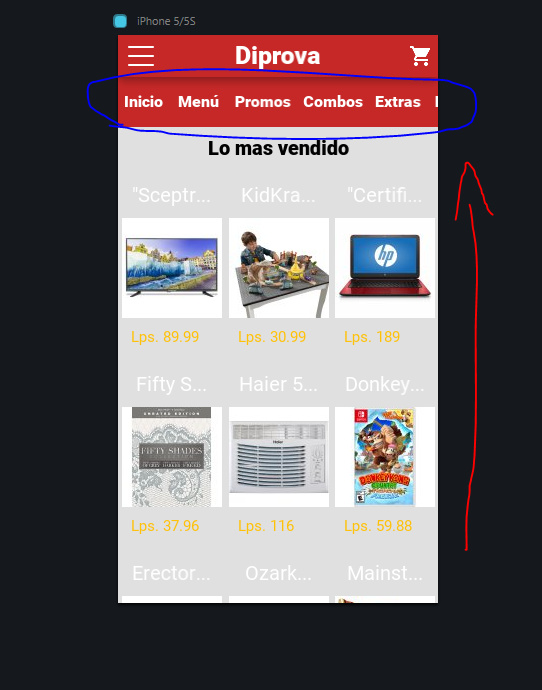
![image](https://cdck-file-uploads-canada1.s3.dualstack.ca-central-1.amazonaws.com/flex035/uploads/fusetools1/original/1X/f00fd8ca5820e4df31af51c66b2b8d5fe4bdac89.jpg)

When the user scrolls to see more products, I want to be able to make the Panel slide up and hide until the user scrolls on the opposite direction.

Do you know a way to manage this?

---

<div class="post-metadata">

### Author: ![Arturs](https://yyz1.discourse-cdn.com/flex035/user_avatar/forums.fusetools.com/arturs/32/582_2.png) [@Arturs](https://forums.fusetools.com/u/Arturs)
#### Post date: [May 7, 2018, 7:38pm UTC](https://forums.fusetools.com/t/scrollable-grid-menu/7135/4 "2018-05-07T19:38:26Z")

</div>

Hey @yisera.

I am glad it worked out for you. 🙂  
To hide element in `ScrollView` you can use [ScrollingAnimation](https://docs.fusetools.com/fuse/triggers/scrollinganimation.html).

---

<div class="post-metadata">

### Author: ![yisera](https://yyz1.discourse-cdn.com/flex035/user_avatar/forums.fusetools.com/yisera/32/701_2.png) [@yisera](https://forums.fusetools.com/u/yisera)
#### Post date: [May 7, 2018, 8:20pm UTC](https://forums.fusetools.com/t/scrollable-grid-menu/7135/5 "2018-05-07T20:20:20Z")

</div>

Yup, kinda works with the following code:

```
<ScrollingAnimation From="0" To="1">
    <Move Target="ClientSubmenu" Y="-1.2" RelativeTo="Size" RelativeNode="MainNavBar" />
</ScrollingAnimation>

```

However like the docs say, `Move` doesn’t affect layout so it does hide but the space doesn’t shrink which is also a desired behavior I would like to achieve.  
Also, when Scrolling down, it disappears but when scrolling up it waits until it reaches to top to display the bar again which isn’t the point. Any idea how can I fix both of these issues?

---

<div class="post-metadata">

### Author: ![Arturs](https://yyz1.discourse-cdn.com/flex035/user_avatar/forums.fusetools.com/arturs/32/582_2.png) [@Arturs](https://forums.fusetools.com/u/Arturs)
#### Post date: [May 8, 2018, 1:04pm UTC](https://forums.fusetools.com/t/scrollable-grid-menu/7135/6 "2018-05-08T13:04:53Z")

</div>

Hey @yisera.

You can use [LayoutAnimation](https://docs.fusetools.com/fuse/triggers/layoutanimation.html) to change width or height of an element in the layout.

To animate elements, while user scrolls you can use [WhileScrollable](https://docs.fusetools.com/fuse/triggers/whilescrollable.html), [WhileScrolled](https://docs.fusetools.com/fuse/triggers/whilescrolled.html) or [WhileInteracting](https://docs.fusetools.com/fuse/triggers/whileinteracting.html).
