# Page inside of page inside of PageControl overlaps

**URL:** https://forums.fusetools.com/t/page-inside-of-page-inside-of-pagecontrol-overlaps/771
**Category:** Bug Reports
**Created:** [March 3, 2016, 12:24am UTC](https://forums.fusetools.com/t/page-inside-of-page-inside-of-pagecontrol-overlaps/771 "2016-03-03T00:24:27Z")
**Posts on this page:** 4
**Page:** 1

<div class="post-metadata">

### Author: ![Edwin\_Reynoso](https://avatars.discourse-cdn.com/v4/letter/e/e99b99/32.png) [@Edwin\_Reynoso](https://forums.fusetools.com/u/Edwin_Reynoso)
#### Post date: [March 3, 2016, 12:24am UTC](https://forums.fusetools.com/t/page-inside-of-page-inside-of-pagecontrol-overlaps/771/1 "2016-03-03T00:24:27Z")

</div>

To replicate problem simply:

1. Download this example from fuse: [https://www.fusetools.com/examples/pages-using-js](https://www.fusetools.com/examples/pages-using-js)
2. Change the MainView.ux to the following:

```auto
<App Theme="Basic" Background="#eee">
    <PageControl>
        <Page>
            <DockPanel>
                <JavaScript File="MainView.js" />
                <StackPanel Dock="Top" Background="#3CB5D0">
                    <StatusBarBackground/>
                    <iOS.StatusBarConfig Style="Light" />
                    <Panel Dock="Top" Height="50">
                        <Text Value="{currentPageTitle}" Alignment="Center" FontSize="25" TextColor="#FFF" />
                        <Panel ux:Name="backButton" Alignment="Left" Width="90" Opacity="0" Padding="20,0,0,0" Height="50" Clicked="{goBack}" HitTestMode="LocalBounds">
                            <DockPanel>
                                <Image File="arrow-left-white.png" Height="20" Color="#fff" Dock="Left" />
                                <Text Alignment="Center" Margin="5,0,0,0" FontSize="18" TextColor="#fff" Dock="Right">
                                    BACK
                                </Text>
                            </DockPanel>
                        </Panel>
                    </Panel>
                </StackPanel>
                <DirectNavigation Active="{currentPageHandle}" />
                <Page Name="pagesList">
                    <ExitingAnimation>
                        <Move X="-1" RelativeTo="Size" Duration="0.3" Easing="CircularInOut" />
                        <Change backButton.Opacity="1" Duration="0.3" />
                    </ExitingAnimation>
                    <ScrollView>
                        <StackPanel>
                            <Each Items="{pages}">
                                <Panel Clicked="{pageButtonClicked}" Height="50" Margin="5">
                                    <Rectangle Layer="Background" CornerRadius="3" Fill="#FF8362" />
                                    <Text Value="{title}" Alignment="Center" TextColor="#fff" FontSize="15" />
                                </Panel>
                            </Each>
                        </StackPanel>
                    </ScrollView>
                </Page>
                <Each Items="{pages}">
                    <Page Name="{handle}">
                        <Text Value="{title}" FontSize="50" TextColor="#3C4663" Alignment="Center" />
                        <ExitingAnimation>
                            <Move X="1" RelativeTo="Size" Duration="0.3" Easing="CircularInOut" />
                        </ExitingAnimation>
                    </Page>
                </Each>
            </DockPanel>
        </Page>
        <Page>
            <Text>HELLO</Text>
        </Page>
    </PageControl>
</App>

```

All I really did:

```auto
<App Theme="Basic" Background="#eee">
    <PageControl>
        <Page>
          *THE DOCKPANEL CODE**
        </Page>
        <Page>
            <Text>HELLO</Text>
        </Page>
    </PageControl>
</App>

```

Now click one of the buttons to see how it overlaps

---

<div class="post-metadata">

### Author: ![Edwin\_Reynoso](https://avatars.discourse-cdn.com/v4/letter/e/e99b99/32.png) [@Edwin\_Reynoso](https://forums.fusetools.com/u/Edwin_Reynoso)
#### Post date: [March 4, 2016, 4:24am UTC](https://forums.fusetools.com/t/page-inside-of-page-inside-of-pagecontrol-overlaps/771/2 "2016-03-04T04:24:33Z")

</div>

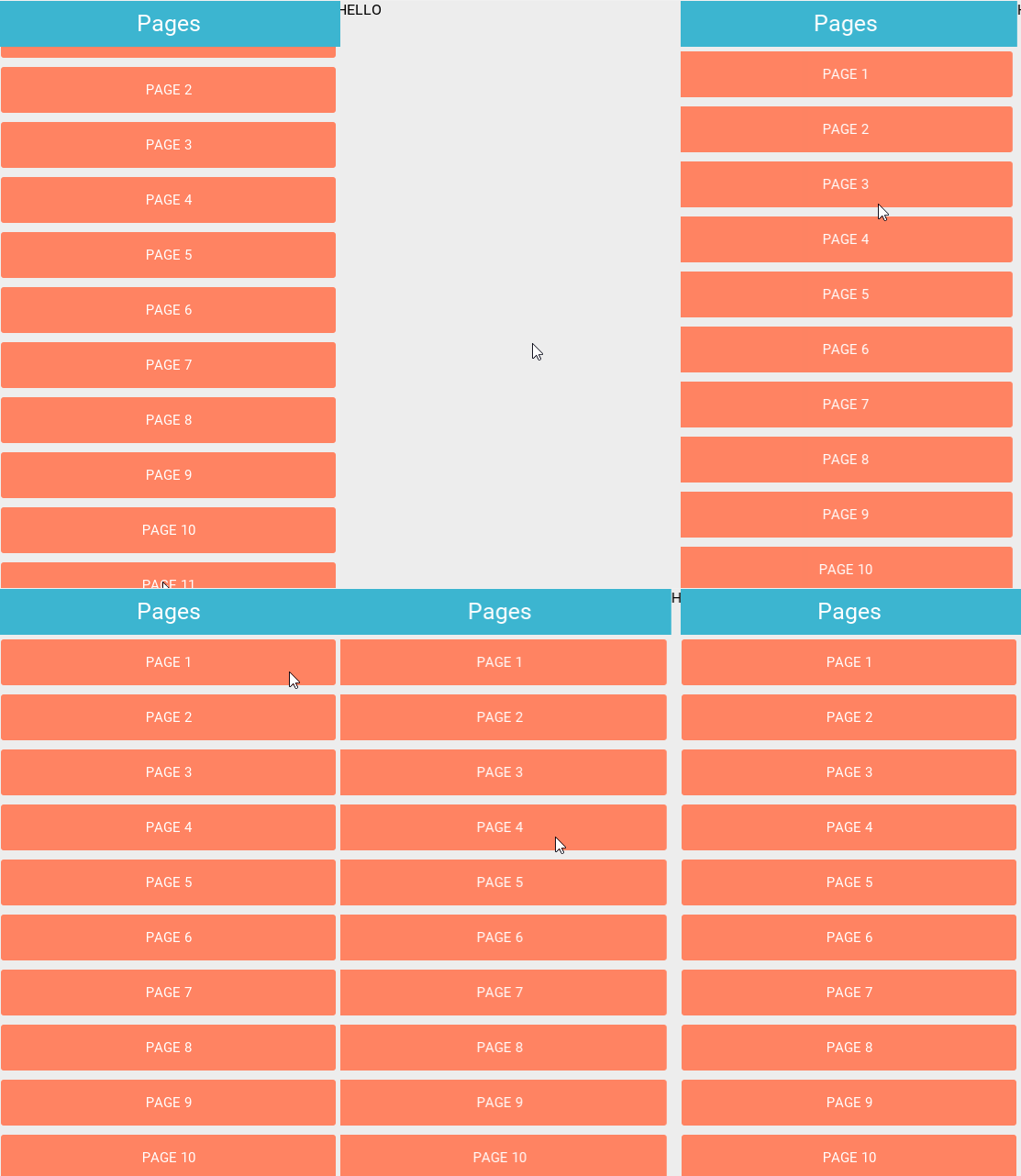
Take a look at the following GIF:

You are suppose to be able to swipe to the second `<Page>` with the `<Text>Hello</Text>` in it. (That part is good)

You are suppose to be able to click on the buttons to swap to a page

The problem is all the pages showing when swiping.

**In the stable main version it showed all the pages on top of the `pagesList`, and when you clicked one it’d still show the `pagesList` so it seems like that was fixed somehow in version 0.10**
 ![file](https://s3.us-east-2.amazonaws.com/fuse-legacy-forum-assets/w9Qc3eBfiMYD-legacy-files-P2NNh7zL3TVptgT5-VOiQMMAAqD8MJj1tqilexFc5.gif)

---

<div class="post-metadata">

### Author: ![Remi\_Pedersen](https://yyz1.discourse-cdn.com/flex035/user_avatar/forums.fusetools.com/remi_pedersen/32/432_2.png) [@Remi\_Pedersen](https://forums.fusetools.com/u/Remi_Pedersen)
#### Post date: [March 4, 2016, 11:25am UTC](https://forums.fusetools.com/t/page-inside-of-page-inside-of-pagecontrol-overlaps/771/3 "2016-03-04T11:25:17Z")

</div>

(We managed to fix the formatting of the post. Right now the html-tag-stripper doesn’t quite work as it should, sorry about that.)

So, the results you’re getting here are as expected. This is because:

- The “inner navigation” (the DirectNavigation) places all the subpages to the right of the screen when they’re not active.
- Everything inside the inner navigation is part of the first page of the outer navigation (the PageControl).
- When that first page is swiped to the left, it means that all those subpages move from “outside the screen on the right-hand side” and onto the screen. In other words: their position relative to the inner navigation stays the same, but the pagecontrol animation means that they turn up on the screen.
- The reason everything gets layered on top of each other is of course because all of the pages have transparent backgrounds. So again, behaving as it should. 🙂

The simplest way to achieve what you want is to make sure that the subpages are _invisible_ when they’re not active in the inner navigation (rather than just “somewhere to the right”).

You can fix this by adding a single line in the `<ExitingAnimation>` for the subpages so that it becomes:

```auto
<ExitingAnimation >
    <Move X="1" RelativeTo="Size" Duration="0.3" Easing="CircularInOut" />
    <Change self.Visibility="Hidden" Duration="0.3"/>
</ExitingAnimation>

```

---

<div class="post-metadata">

### Author: ![Edwin\_Reynoso](https://avatars.discourse-cdn.com/v4/letter/e/e99b99/32.png) [@Edwin\_Reynoso](https://forums.fusetools.com/u/Edwin_Reynoso)
#### Post date: [March 14, 2016, 9:42am UTC](https://forums.fusetools.com/t/page-inside-of-page-inside-of-pagecontrol-overlaps/771/4 "2016-03-14T09:42:21Z")

</div>

Hey sorry for the late reply, I got it working thanks, but still trying to wrap my head around it.
