# CameraView not working
**URL:** https://forums.fusetools.com/t/cameraview-not-working/3244
**Category:** Bug Reports
**Created:** [May 26, 2017, 8:55am UTC](https://forums.fusetools.com/t/cameraview-not-working/3244 "2017-05-26T08:55:33Z")
**Posts on this page:** 20
**Page:** 1
### Author:  [@r54r45r54](https://forums.fusetools.com/u/r54r45r54)
#### Post date: [May 26, 2017, 8:55am UTC](https://forums.fusetools.com/t/cameraview-not-working/3244/1 "2017-05-26T08:55:33Z")
I have done uno clean after installing new version (Fuse version 1.0.0 (build 13426))
and did “uno install Fuse.Controls.CameraView in project directory”
and followed your guide (Very Simple Code)
```auto
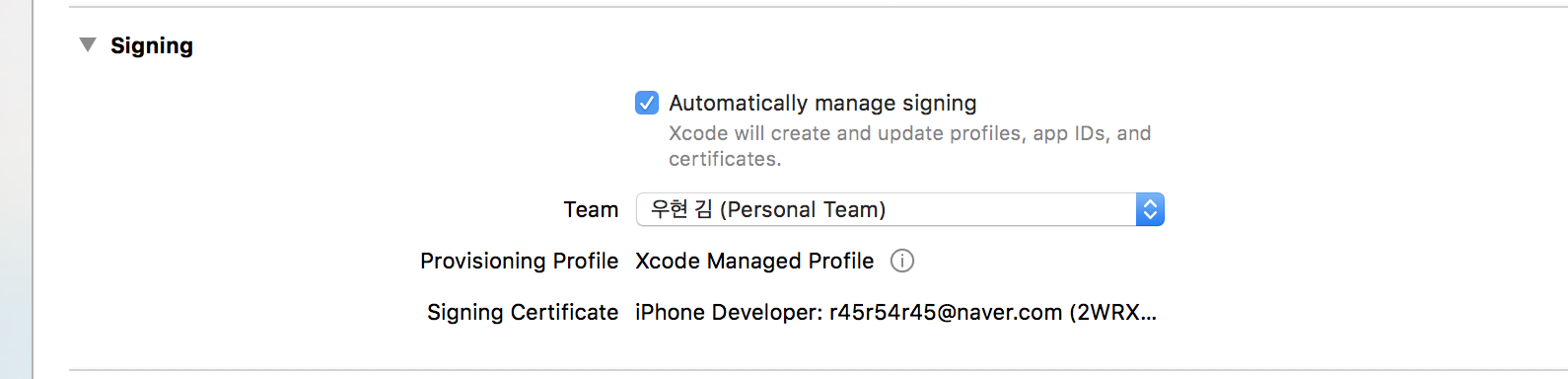
```
```auto
{
"RootNamespace":"App",
"Packages": [
"Fuse",
"FuseJS",
"Fuse.Controls.CameraView",
"Fuse.ImageTools"
],
"Includes": [
"*"
]
}
```
but when previewing in ios device (version 10.3.2, iphone7 plus), camera feed doesn’t come out and only white screen appears.
And in console, the error log says {hasBack} is not present
What should I do to solve this problem.
---
### Author:  [@Noah\_Hall](https://forums.fusetools.com/u/Noah_Hall)
#### Post date: [May 26, 2017, 8:58am UTC](https://forums.fusetools.com/t/cameraview-not-working/3244/2 "2017-05-26T08:58:25Z")
Hi r54r45r54,
Can I just confirm that you are testing this on the device itself, and not in a simulator?
What happens if you try this:
```auto
```
?
---
### Author:  [@r54r45r54](https://forums.fusetools.com/u/r54r45r54)
#### Post date: [May 26, 2017, 8:59am UTC](https://forums.fusetools.com/t/cameraview-not-working/3244/3 "2017-05-26T08:59:41Z")
i am testing this on device itself
just white background appears apparently not camera feed
---
### Author:  [@Noah\_Hall](https://forums.fusetools.com/u/Noah_Hall)
#### Post date: [May 26, 2017, 9:01am UTC](https://forums.fusetools.com/t/cameraview-not-working/3244/4 "2017-05-26T09:01:07Z")
What happens if you run this inside the project folder:
```auto
uno build -t ios -r
```
?
---
### Author:  [@r54r45r54](https://forums.fusetools.com/u/r54r45r54)
#### Post date: [May 26, 2017, 9:07am UTC](https://forums.fusetools.com/t/cameraview-not-working/3244/5 "2017-05-26T09:07:17Z")
```auto
Uno 1.0.11 (build 5362) OS X 10.12 i386 7cd79e2
Configuring (0.7 s)
Compiling syntax tree (2.0 s)
Generating code and data (6.2 s)
Building iOS app
**BUILD FAILED**
The following build commands failed:
Check dependencies
(1 failure)
Error: Xcode couldn't find a provisioning profile. Try building from the Xcode GUI and/or setting the 'iOS.DevelopmentTeam' variable in your '.unoproj' or '~/.unoconfig' to solve this problem. Pass the '--debug' flag to Uno to open the Xcode GUI. Pass the '-v' flag to Uno for more information about the error. Now opening Xcode.
=== BUILD TARGET App OF PROJECT App WITH THE DEFAULT CONFIGURATION (Release) ===
Check dependencies
No profiles for 'com.apps.app' were found: Xcode couldn't find a provisioning profile matching 'com.apps.app'.
Code signing is required for product type 'Application' in SDK 'iOS 10.3'
Code signing is required for product type 'Application' in SDK 'iOS 10.3'
Error: Xcode couldn't find a provisioning profile. Try building from the Xcode GUI and/or setting the 'iOS.DevelopmentTeam' variable in your '.unoproj' or '~/.unoconfig' to solve this problem. Pass the '--debug' flag to Uno to open the Xcode GUI. Pass the '-v' flag to Uno for more information about the error. Now opening Xcode.
(unknown): E0200: iOS build failed
(3.0 s)
Build completed in 11.89 seconds
1 error
```
it says I have to manually set provisioning profile in xcode
so I did manual setting
after installation in my phone, obviously i have to confirm that this app can use my camera.

and after click the ok button, just this white screen comes out

here is the log from xcode
```auto
2017-05-26 18:04:00.378171+0900 App[2120:740877] [DYMTLInitPlatform] platform initialization successful
2017-05-26 18:04:00.426892+0900 App[2120:740757] Metal GPU Frame Capture Enabled
2017-05-26 18:04:00.427348+0900 App[2120:740757] Metal API Validation Enabled
2017-05-26 18:04:00.468884+0900 App[2120:740757] libMobileGestalt MobileGestaltSupport.m:153: pid 2120 (App) does not have sandbox access for frZQaeyWLUvLjeuEK43hmg and IS NOT appropriately entitled
2017-05-26 18:04:00.468963+0900 App[2120:740757] libMobileGestalt MobileGestalt.c:550: no access to InverseDeviceID (see )
2017-05-26 18:04:01.548331+0900 App[2120:740757] [MC] System group container for systemgroup.com.apple.configurationprofiles path is /private/var/containers/Shared/SystemGroup/systemgroup.com.apple.configurationprofiles
2017-05-26 18:04:01.549883+0900 App[2120:740757] [MC] Reading from public effective user settings.
```
---
### Author:  [@Noah\_Hall](https://forums.fusetools.com/u/Noah_Hall)
#### Post date: [May 26, 2017, 9:09am UTC](https://forums.fusetools.com/t/cameraview-not-working/3244/6 "2017-05-26T09:09:53Z")
Very strange. Can you run:
```auto
uno -t ios --debug
```
and then launch the app in xcode to your device? That should give you some more info to help me debug this.
---
### Author:  [@r54r45r54](https://forums.fusetools.com/u/r54r45r54)
#### Post date: [May 26, 2017, 9:12am UTC](https://forums.fusetools.com/t/cameraview-not-working/3244/7 "2017-05-26T09:12:57Z")
it says when I run that `uno -t ios --debug`
```auto
ERROR: '-t' is not a valid command -- see "uno --help" for a list of commands.
```
maybe my uno version matters?
---
### Author:  [@r54r45r54](https://forums.fusetools.com/u/r54r45r54)
#### Post date: [May 26, 2017, 9:13am UTC](https://forums.fusetools.com/t/cameraview-not-working/3244/8 "2017-05-26T09:13:24Z")
```auto
gim-uhyeons-MacBook-Pro:App woohyunkim$ uno --version
Uno version 1.0.11 (build 5362) OS X 10.12 i386 7cd79e2
Copyright (C) 2015-2016 Fusetools
Product information
Product.Commit 7cd79e29dadc60a7a9926b6a63ab549026764da3
Product.Version 1.0.11.5362
Runtime environment
Environment.OSVersion Unix 16.4.0.0
Environment.Version 4.0.30319.42000
```
---
### Author:  [@Noah\_Hall](https://forums.fusetools.com/u/Noah_Hall)
#### Post date: [May 26, 2017, 9:14am UTC](https://forums.fusetools.com/t/cameraview-not-working/3244/9 "2017-05-26T09:14:20Z")
Sorry, my bad - that should’ve been
```auto
uno build -t ios --debug
```
---
### Author:  [@r54r45r54](https://forums.fusetools.com/u/r54r45r54)
#### Post date: [May 26, 2017, 9:17am UTC](https://forums.fusetools.com/t/cameraview-not-working/3244/10 "2017-05-26T09:17:03Z")
log in xcode says
```auto
2017-05-26 18:16:05.060183+0900 App[2139:745721] [DYMTLInitPlatform] platform initialization successful
2017-05-26 18:16:05.136847+0900 App[2139:745602] Metal GPU Frame Capture Enabled
2017-05-26 18:16:05.137599+0900 App[2139:745602] Metal API Validation Enabled
2017-05-26 18:16:05.192634+0900 App[2139:745602] libMobileGestalt MobileGestaltSupport.m:153: pid 2139 (App) does not have sandbox access for frZQaeyWLUvLjeuEK43hmg and IS NOT appropriately entitled
2017-05-26 18:16:05.192806+0900 App[2139:745602] libMobileGestalt MobileGestalt.c:550: no access to InverseDeviceID (see )
2017-05-26 18:16:06.434347+0900 App[2139:745602] [MC] System group container for systemgroup.com.apple.configurationprofiles path is /private/var/containers/Shared/SystemGroup/systemgroup.com.apple.configurationprofiles
2017-05-26 18:16:06.434961+0900 App[2139:745602] [MC] Reading from public effective user settings.
```
oh same as before
```auto
gim-uhyeons-MacBook-Pro:App woohyunkim$ uno build -t ios --debug
Uno 1.0.11 (build 5362) OS X 10.12 i386 7cd79e2
Configuring (2.3 s)
Compiling syntax tree (1.4 s)
Generating code and data (5.1 s)
Build completed in 8.79 seconds
--- debug
Opening Xcode
```
---
### Author:  [@Noah\_Hall](https://forums.fusetools.com/u/Noah_Hall)
#### Post date: [May 26, 2017, 9:21am UTC](https://forums.fusetools.com/t/cameraview-not-working/3244/11 "2017-05-26T09:21:04Z")
Hmm, interesting. This seems to be the error:
```auto
2017-05-26 18:16:05.192806+0900 App[2139:745602] libMobileGestalt MobileGestalt.c:550: no access to InverseDeviceID (see )
```
I haven’t seen this error before, but is there anything particularly unusual about the way your AppleID developer account is set up?
---
### Author:  [@r54r45r54](https://forums.fusetools.com/u/r54r45r54)
#### Post date: [May 26, 2017, 9:29am UTC](https://forums.fusetools.com/t/cameraview-not-working/3244/12 "2017-05-26T09:29:02Z")
umm i didnt enroll to developer’s account
which means my developer’s account duration has expired
---
### Author:  [@r54r45r54](https://forums.fusetools.com/u/r54r45r54)
#### Post date: [May 26, 2017, 9:30am UTC](https://forums.fusetools.com/t/cameraview-not-working/3244/13 "2017-05-26T09:30:06Z")
---
### Author:  [@Noah\_Hall](https://forums.fusetools.com/u/Noah_Hall)
#### Post date: [May 26, 2017, 11:44am UTC](https://forums.fusetools.com/t/cameraview-not-working/3244/14 "2017-05-26T11:44:33Z")
Perhaps that is the problem, that you need to renew your iOS developer account then?
---
### Author:  [@r54r45r54](https://forums.fusetools.com/u/r54r45r54)
#### Post date: [May 29, 2017, 2:42am UTC](https://forums.fusetools.com/t/cameraview-not-working/3244/15 "2017-05-29T02:42:41Z")
I renewed my account but still have this error and same symptom
```auto
2017-05-29 11:39:51.466001+0900 App[4207:1669910] [DYMTLInitPlatform] platform initialization successful
2017-05-29 11:39:51.551439+0900 App[4207:1669722] Metal GPU Frame Capture Enabled
2017-05-29 11:39:51.552409+0900 App[4207:1669722] Metal API Validation Enabled
2017-05-29 11:39:51.630454+0900 App[4207:1669722] libMobileGestalt MobileGestaltSupport.m:153: pid 4207 (App) does not have sandbox access for frZQaeyWLUvLjeuEK43hmg and IS NOT appropriately entitled
2017-05-29 11:39:51.630712+0900 App[4207:1669722] libMobileGestalt MobileGestalt.c:550: no access to InverseDeviceID (see )
2017-05-29 11:40:06.224108+0900 App[4207:1669722] [MC] System group container for systemgroup.com.apple.configurationprofiles path is /private/var/containers/Shared/SystemGroup/systemgroup.com.apple.configurationprofiles
2017-05-29 11:40:06.227135+0900 App[4207:1669722] [MC] Reading from public effective user settings.
```
---
### Author:  [@Noah\_Hall](https://forums.fusetools.com/u/Noah_Hall)
#### Post date: [May 29, 2017, 8:00am UTC](https://forums.fusetools.com/t/cameraview-not-working/3244/16 "2017-05-29T08:00:35Z")
Have you tried completely uninstalling the app, then reinstalling it with the correct account? It still looks like a permissions error
---
### Author:  [@r54r45r54](https://forums.fusetools.com/u/r54r45r54)
#### Post date: [May 29, 2017, 8:51am UTC](https://forums.fusetools.com/t/cameraview-not-working/3244/17 "2017-05-29T08:51:37Z")
Should i reinstall xcode also?
---
### Author:  [@Noah\_Hall](https://forums.fusetools.com/u/Noah_Hall)
#### Post date: [May 29, 2017, 8:53am UTC](https://forums.fusetools.com/t/cameraview-not-working/3244/18 "2017-05-29T08:53:31Z")
No, I don’t think so - it should just be the app on the device.
---
### Author:  [@r54r45r54](https://forums.fusetools.com/u/r54r45r54)
#### Post date: [June 5, 2017, 9:15am UTC](https://forums.fusetools.com/t/cameraview-not-working/3244/19 "2017-06-05T09:15:51Z")
this still hasn’t fixed for me.
when I try to export to ios,
```auto
Configuring (2.2 s)
Compiling syntax tree (1.5 s)
Generating code and data (6.3 s)
Building iOS app
/Users/woohyunkim/Fuse/App1/build/iOS/Debug/src/iOS/UCameraView.mm:18:22: warning: assigning retained object to weak property; object will be released after assignment [-Warc-unsafe-retained-assign]
/Users/woohyunkim/Fuse/App1/build/iOS/Debug/src/iOS/UCameraView.mm:54:25: warning: assigning retained object to weak property; object will be released after assignment [-Warc-unsafe-retained-assign]
/Users/woohyunkim/Fuse/App1/build/iOS/Debug/src/iOS/UCameraView.mm:62:24: warning: assigning retained object to weak property; object will be released after assignment [-Warc-unsafe-retained-assign]
/Users/woohyunkim/Fuse/App1/build/iOS/Debug/src/iOS/VideoImpl.mm:182:21: warning: 'naturalSize' is deprecated: first deprecated in iOS 5.0 [-Wdeprecated-declarations]
/Users/woohyunkim/Fuse/App1/build/iOS/Debug/src/iOS/VideoImpl.mm:188:21: warning: 'naturalSize' is deprecated: first deprecated in iOS 5.0 [-Wdeprecated-declarations]
/Users/woohyunkim/Fuse/App1/build/iOS/Debug/src/ios/Jetfire/WebSocketClientObjc.m:2:9: warning: non-portable path to file '"iOS/Jetfire/WebSocketClientObjc.h"'; specified path differs in case from file name on disk [-Wnonportable-include-path]
/Users/woohyunkim/Fuse/App1/build/iOS/Debug/src/Jetfire.WebSocketClient.mm:4:10: warning: non-portable path to file ''; specified path differs in case from file name on disk [-Wnonportable-include-path]
/Users/woohyunkim/Fuse/App1/build/iOS/Debug/src/iOS/UCameraView.mm:18:22: warning: assigning retained object to weak property; object will be released after assignment [-Warc-unsafe-retained-assign]
/Users/woohyunkim/Fuse/App1/build/iOS/Debug/src/iOS/UCameraView.mm:54:25: warning: assigning retained object to weak property; object will be released after assignment [-Warc-unsafe-retained-assign]
/Users/woohyunkim/Fuse/App1/build/iOS/Debug/src/iOS/UCameraView.mm:62:24: warning: assigning retained object to weak property; object will be released after assignment [-Warc-unsafe-retained-assign]
/Users/woohyunkim/Fuse/App1/build/iOS/Debug/src/iOS/VideoImpl.mm:182:21: warning: 'naturalSize' is deprecated: first deprecated in iOS 5.0 [-Wdeprecated-declarations]
/Users/woohyunkim/Fuse/App1/build/iOS/Debug/src/iOS/VideoImpl.mm:188:21: warning: 'naturalSize' is deprecated: first deprecated in iOS 5.0 [-Wdeprecated-declarations]
/Users/woohyunkim/Fuse/App1/build/iOS/Debug/src/ios/Jetfire/WebSocketClientObjc.m:2:9: warning: non-portable path to file '"iOS/Jetfire/WebSocketClientObjc.h"'; specified path differs in case from file name on disk [-Wnonportable-include-path]
/Users/woohyunkim/Fuse/App1/build/iOS/Debug/src/Uno.g.cpp:7406:68: warning: implicit conversion loses integer precision: 'size_t' (aka 'unsigned long') to 'int' [-Wshorten-64-to-32]
/Users/woohyunkim/Fuse/App1/build/iOS/Debug/src/Uno.Net.Sockets.g.cpp:197:15: warning: implicit conversion loses integer precision: 'ssize_t' (aka 'long') to 'int' [-Wshorten-64-to-32]
/Users/woohyunkim/Fuse/App1/build/iOS/Debug/src/Uno.Net.Sockets.g.cpp:208:15: warning: implicit conversion loses integer precision: 'ssize_t' (aka 'long') to 'int' [-Wshorten-64-to-32]
/Users/woohyunkim/Fuse/App1/build/iOS/Debug/src/Jetfire.WebSocketClient.mm:4:10: warning: non-portable path to file ''; specified path differs in case from file name on disk [-Wnonportable-include-path]
/Users/woohyunkim/Fuse/App1/build/iOS/Debug/App1/Images.xcassets:./AppIcon.appiconset: warning: A 83.5x83.5@2x app icon is required for iPad apps targeting iOS 9.0 and later
(34.3 s)
Build completed in 44.35 seconds
---
[....] Waiting for iOS device to be connected
[....] Using e07e98258287ab6f3c90187ecfba0d7ec50562db (D111AP, iPhone 7 Plus, iphoneos, arm64) a.k.a. 'iPhone'.
------ Install phase ------
[0%] Found e07e98258287ab6f3c90187ecfba0d7ec50562db (D111AP, iPhone 7 Plus, iphoneos, arm64) a.k.a. 'iPhone' connected through USB, beginning install
[5%] Copying /Users/woohyunkim/Fuse/App1/build/iOS/Debug/build/Release-iphoneos/App1.app/META-INF/ to device
[5%] Copying /Users/woohyunkim/Fuse/App1/build/iOS/Debug/build/Release-iphoneos/App1.app/META-INF/com.apple.ZipMetadata.plist to device
[5%] Copying /Users/woohyunkim/Fuse/App1/build/iOS/Debug/build/Release-iphoneos/App1.app/_CodeSignature/ to device
[6%] Copying /Users/woohyunkim/Fuse/App1/build/iOS/Debug/build/Release-iphoneos/App1.app/_CodeSignature/CodeResources to device
[6%] Copying /Users/woohyunkim/Fuse/App1/build/iOS/Debug/build/Release-iphoneos/App1.app/App1 to device
[27%] Copying /Users/woohyunkim/Fuse/App1/build/iOS/Debug/build/Release-iphoneos/App1.app/AppIcon29x29@2x.png to device
[28%] Copying /Users/woohyunkim/Fuse/App1/build/iOS/Debug/build/Release-iphoneos/App1.app/AppIcon29x29@2x~ipad.png to device
[28%] Copying /Users/woohyunkim/Fuse/App1/build/iOS/Debug/build/Release-iphoneos/App1.app/AppIcon29x29@3x.png to device
[29%] Copying /Users/woohyunkim/Fuse/App1/build/iOS/Debug/build/Release-iphoneos/App1.app/AppIcon29x29~ipad.png to device
[29%] Copying /Users/woohyunkim/Fuse/App1/build/iOS/Debug/build/Release-iphoneos/App1.app/AppIcon40x40@2x.png to device
[30%] Copying /Users/woohyunkim/Fuse/App1/build/iOS/Debug/build/Release-iphoneos/App1.app/AppIcon40x40@2x~ipad.png to device
[30%] Copying /Users/woohyunkim/Fuse/App1/build/iOS/Debug/build/Release-iphoneos/App1.app/AppIcon40x40@3x.png to device
[31%] Copying /Users/woohyunkim/Fuse/App1/build/iOS/Debug/build/Release-iphoneos/App1.app/AppIcon40x40~ipad.png to device
[31%] Copying /Users/woohyunkim/Fuse/App1/build/iOS/Debug/build/Release-iphoneos/App1.app/AppIcon60x60@2x.png to device
[31%] Copying /Users/woohyunkim/Fuse/App1/build/iOS/Debug/build/Release-iphoneos/App1.app/AppIcon60x60@3x.png to device
[32%] Copying /Users/woohyunkim/Fuse/App1/build/iOS/Debug/build/Release-iphoneos/App1.app/AppIcon76x76@2x~ipad.png to device
[32%] Copying /Users/woohyunkim/Fuse/App1/build/iOS/Debug/build/Release-iphoneos/App1.app/AppIcon76x76~ipad.png to device
[33%] Copying /Users/woohyunkim/Fuse/App1/build/iOS/Debug/build/Release-iphoneos/App1.app/data/ to device
[33%] Copying /Users/woohyunkim/Fuse/App1/build/iOS/Debug/build/Release-iphoneos/App1.app/data/bundle to device
[34%] Copying /Users/woohyunkim/Fuse/App1/build/iOS/Debug/build/Release-iphoneos/App1.app/data/diagnostics-4c71cb84.js to device
[34%] Copying /Users/woohyunkim/Fuse/App1/build/iOS/Debug/build/Release-iphoneos/App1.app/data/es6-promise.min-a3069df9.js to device
[35%] Copying /Users/woohyunkim/Fuse/App1/build/iOS/Debug/build/Release-iphoneos/App1.app/data/eventemitter-8bcf984c.js to device
[35%] Copying /Users/woohyunkim/Fuse/App1/build/iOS/Debug/build/Release-iphoneos/App1.app/data/eventtarget-c2230a48.js to device
[35%] Copying /Users/woohyunkim/Fuse/App1/build/iOS/Debug/build/Release-iphoneos/App1.app/data/fetch-bb921dd9.js to device
[36%] Copying /Users/woohyunkim/Fuse/App1/build/iOS/Debug/build/Release-iphoneos/App1.app/data/file-ffac368b.js to device
[36%] Copying /Users/woohyunkim/Fuse/App1/build/iOS/Debug/build/Release-iphoneos/App1.app/data/localstorage-5815a0c9.js to device
[37%] Copying /Users/woohyunkim/Fuse/App1/build/iOS/Debug/build/Release-iphoneos/App1.app/data/observable-66183501.js to device
[37%] Copying /Users/woohyunkim/Fuse/App1/build/iOS/Debug/build/Release-iphoneos/App1.app/data/settimeout-cb0e3491.js to device
[38%] Copying /Users/woohyunkim/Fuse/App1/build/iOS/Debug/build/Release-iphoneos/App1.app/data/websocketapi-2132f288.js to device
[38%] Copying /Users/woohyunkim/Fuse/App1/build/iOS/Debug/build/Release-iphoneos/App1.app/data/window-7fb232c1.js to device
[39%] Copying /Users/woohyunkim/Fuse/App1/build/iOS/Debug/build/Release-iphoneos/App1.app/data/windowbase64-3a81b2e2.js to device
[39%] Copying /Users/woohyunkim/Fuse/App1/build/iOS/Debug/build/Release-iphoneos/App1.app/data/windowtimers-6aa3303d.js to device
[40%] Copying /Users/woohyunkim/Fuse/App1/build/iOS/Debug/build/Release-iphoneos/App1.app/data/xmlhttprequest-28ec9821.js to device
[40%] Copying /Users/woohyunkim/Fuse/App1/build/iOS/Debug/build/Release-iphoneos/App1.app/embedded.mobileprovision to device
[40%] Copying /Users/woohyunkim/Fuse/App1/build/iOS/Debug/build/Release-iphoneos/App1.app/Frameworks/ to device
[41%] Copying /Users/woohyunkim/Fuse/App1/build/iOS/Debug/build/Release-iphoneos/App1.app/Frameworks/Jetfire.framework/ to device
[41%] Copying /Users/woohyunkim/Fuse/App1/build/iOS/Debug/build/Release-iphoneos/App1.app/Frameworks/Jetfire.framework/_CodeSignature/ to device
[42%] Copying /Users/woohyunkim/Fuse/App1/build/iOS/Debug/build/Release-iphoneos/App1.app/Frameworks/Jetfire.framework/_CodeSignature/CodeResources to device
[42%] Copying /Users/woohyunkim/Fuse/App1/build/iOS/Debug/build/Release-iphoneos/App1.app/Frameworks/Jetfire.framework/Info.plist to device
[43%] Copying /Users/woohyunkim/Fuse/App1/build/iOS/Debug/build/Release-iphoneos/App1.app/Frameworks/Jetfire.framework/Jetfire to device
[44%] Copying /Users/woohyunkim/Fuse/App1/build/iOS/Debug/build/Release-iphoneos/App1.app/Info.plist to device
[44%] Copying /Users/woohyunkim/Fuse/App1/build/iOS/Debug/build/Release-iphoneos/App1.app/LaunchImage-700-568h@2x.png to device
[44%] Copying /Users/woohyunkim/Fuse/App1/build/iOS/Debug/build/Release-iphoneos/App1.app/LaunchImage-700-Landscape@2x~ipad.png to device
[45%] Copying /Users/woohyunkim/Fuse/App1/build/iOS/Debug/build/Release-iphoneos/App1.app/LaunchImage-700-Landscape~ipad.png to device
[46%] Copying /Users/woohyunkim/Fuse/App1/build/iOS/Debug/build/Release-iphoneos/App1.app/LaunchImage-700-Portrait@2x~ipad.png to device
[46%] Copying /Users/woohyunkim/Fuse/App1/build/iOS/Debug/build/Release-iphoneos/App1.app/LaunchImage-700-Portrait~ipad.png to device
[47%] Copying /Users/woohyunkim/Fuse/App1/build/iOS/Debug/build/Release-iphoneos/App1.app/LaunchImage-700@2x.png to device
[47%] Copying /Users/woohyunkim/Fuse/App1/build/iOS/Debug/build/Release-iphoneos/App1.app/LaunchImage-800-667h@2x.png to device
[48%] Copying /Users/woohyunkim/Fuse/App1/build/iOS/Debug/build/Release-iphoneos/App1.app/LaunchImage-800-Landscape-736h@3x.png to device
[48%] Copying /Users/woohyunkim/Fuse/App1/build/iOS/Debug/build/Release-iphoneos/App1.app/LaunchImage-800-Portrait-736h@3x.png to device
[49%] Copying /Users/woohyunkim/Fuse/App1/build/iOS/Debug/build/Release-iphoneos/App1.app/PkgInfo to device
[52%] CreatingStagingDirectory
[57%] ExtractingPackage
[60%] InspectingPackage
[60%] TakingInstallLock
[65%] PreflightingApplication
[65%] InstallingEmbeddedProfile
[70%] VerifyingApplication
[75%] CreatingContainer
[80%] InstallingApplication
[85%] PostflightingApplication
[90%] SandboxingApplication
[95%] GeneratingApplicationMap
[100%] Installed package build/Release-iphoneos/App1.app
------ Debug phase ------
Starting debug of e07e98258287ab6f3c90187ecfba0d7ec50562db (D111AP, iPhone 7 Plus, iphoneos, arm64) a.k.a. 'iPhone' connected through USB...
[0%] Looking up developer disk image
[95%] Developer disk image mounted successfully
[100%] Connecting to remote debug server
-------------------------
(lldb) command source -s 0 '/tmp/B0453942-821E-4290-A04F-33AC5A665AAD/fruitstrap-lldb-prep-cmds-e07e98258287ab6f3c90187ecfba0d7ec50562db'
Executing commands in '/tmp/B0453942-821E-4290-A04F-33AC5A665AAD/fruitstrap-lldb-prep-cmds-e07e98258287ab6f3c90187ecfba0d7ec50562db'.
(lldb) platform select remote-ios --sysroot '/Users/woohyunkim/Library/Developer/Xcode/iOS DeviceSupport/10.3.2 (14F89)/Symbols'
Platform: remote-ios
Connected: no
SDK Path: "/Users/woohyunkim/Library/Developer/Xcode/iOS DeviceSupport/10.3.2 (14F89)/Symbols"
(lldb) target create "/Users/woohyunkim/Fuse/App1/build/iOS/Debug/build/Release-iphoneos/App1.app"
Current executable set to '/Users/woohyunkim/Fuse/App1/build/iOS/Debug/build/Release-iphoneos/App1.app' (arm64).
(lldb) script fruitstrap_device_app="/private/var/containers/Bundle/Application/69FBE241-E353-48C7-95B2-428F70BE23EE/App1.app"
(lldb) script fruitstrap_connect_url="connect://127.0.0.1:62252"
(lldb) target modules search-paths add /usr "/Users/woohyunkim/Library/Developer/Xcode/iOS DeviceSupport/10.3.2 (14F89)/Symbols/usr" /System "/Users/woohyunkim/Library/Developer/Xcode/iOS DeviceSupport/10.3.2 (14F89)/Symbols/System" "/private/var/containers/Bundle/Application/69FBE241-E353-48C7-95B2-428F70BE23EE" "/Users/woohyunkim/Fuse/App1/build/iOS/Debug/build/Release-iphoneos" "/var/containers/Bundle/Application/69FBE241-E353-48C7-95B2-428F70BE23EE" "/Users/woohyunkim/Fuse/App1/build/iOS/Debug/build/Release-iphoneos" /Developer "/Users/woohyunkim/Library/Developer/Xcode/iOS DeviceSupport/10.3.2 (14F89)/Symbols/Developer"
(lldb) command script import "/tmp/B0453942-821E-4290-A04F-33AC5A665AAD/fruitstrap_e07e98258287ab6f3c90187ecfba0d7ec50562db.py"
(lldb) command script add -f fruitstrap_e07e98258287ab6f3c90187ecfba0d7ec50562db.connect_command connect
(lldb) command script add -s asynchronous -f fruitstrap_e07e98258287ab6f3c90187ecfba0d7ec50562db.run_command run
(lldb) command script add -s asynchronous -f fruitstrap_e07e98258287ab6f3c90187ecfba0d7ec50562db.autoexit_command autoexit
(lldb) command script add -s asynchronous -f fruitstrap_e07e98258287ab6f3c90187ecfba0d7ec50562db.safequit_command safequit
(lldb) connect
(lldb) run
error: process launch failed: Security
(lldb) autoexit
```
this ends with error.
what’s the problem here??
why can’t I run the simple code
```auto
```
---
### Author:  [@Uldis](https://forums.fusetools.com/u/Uldis)
#### Post date: [June 5, 2017, 12:45pm UTC](https://forums.fusetools.com/t/cameraview-not-working/3244/20 "2017-06-05T12:45:05Z")
Hi r54r45r54,
some quick googling tells me this has nothing to do with Fuse. It’s likely somehow related to if & how you’ve set up your Apple ID and / or a Sandbox user. Plus if you’ve logged in on the testing device with the right account.
And it’s likely not directly related to `CameraView` either.
I suggest you check your Apple ID config in iTunes connect and other Apple sites, and make sure you’ve got the right Apple ID authenticated on the device itself.